Showing posts with label android app. Show all posts

Friday, 29 June 2012

PowerAMP Vs. doubleTwist Player


 PowerAMP is a powerful music player for Android. Key Features:

Plays mp3, mp4/m4a* (including alac), ogg*, wma*, flac, wav, ape, wv, tta ( some files may require NEON support).10 band graphical equalizer for all supported formats, presets.Separate Bass and Treble adjustment.Can plays songs from folders and from system media library.


The Best
  • One of the best fully featured Android music media players.
  • Features equalizer for custom or built in presets.
  • Super slick user interface with themes.
The Worst
  • Playing Podcasts is not allowed.


doubleTwist for Android is a fully featured music and video player that smoothly integrates with the free doubleTwist desktop client on Mac/PC. It can automatically imports your iTunes playlists, ratings and play-counts. It gives an integrated video player and manages podcasts synced from your PC.

The Best
  • One of the top music players for Android
  • Syncs together  with iTunes playlists and audio/video podcasts
  • Transfer of ratings, play count, and other information between the phone and doubleTwist for desktop
  • Without difficulty set songs as ringtones from the app
  • Runs with wired earbud music controllers
The Worst
  • Only plays music stored on SD Card.
  • Cannot create a playlist through the device, have to  be done through desktop software


Tuesday, 26 June 2012

Kingsoft Office Vs. OfficeSuite Pro


OfficeSuite Pro

View, Edit, Print and Share your office documents on the go!

The app is made by MobiSystems, OfficeSuite Pro allows you to view, create, edit, print and share Word, Excel and PowerPoint files on the go. you can also open attachments and see PDF files on an Android based phone or tablet with our feature-rich mobile office tools solution.

 The Best

  • Google Docs is integrated
  • Most fluid text selection implementation available
  • Ability to Pinch-to-Zoom through documents
  • Can zip and unzip files within its File Manager
  • Great use of screen space for its tablet-optimized UI
  • PDF rendering ability challenges Adobe’s own PDF Viewer

The Worst

  • No spellchecker available.
  • Lack of ability to sync with Dropbox through the application.


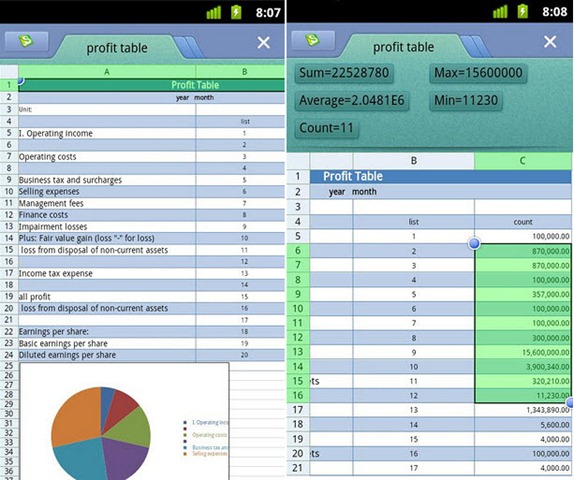
Kingsoft Office

 Kingsoft Office


Kingsoft Office Suite offers a some of features for creating, viewing and editing personal and business documents. Kingsoft Office 2012 contains Kingsoft Writer, Kingsoft Presentation and Kingsoft Spreadsheets which correspond to all the major elements found in Microsoft Office i.e. Excel, Word and Powerpoint. Kingsoft Office Suite is suitable for both personal and professional use although the professional version offers further features that will fulfill the demands of business users.


The Best
  • Cheap alternative of Microsoft Office.
  • Compatible with Microsoft Office files.
  • Encrypt and convert documents to PDF.
  • small size.
The Worst
  • Lacks more effective features of Microsoft Office.
  • Presentation tool not as mighty as Powerpoint.


Anti-Virus Pro Vs. Avast Mobile Security


AVG
 Anti-Virus Pro
 
Keep your device safe with just one click. Download Anti-virus Pro today and Scan apps, settings, files, and media in real time. Find your lost phone and locate it on a map. Back up and restore all your valuable apps and data. Eliminate tasks that slow your phone down. Ensures emails, contacts, bookmarks and text messages are away from danger. Scan media files for vulnerabilities. Run daily, weekly, or on demand. Lock or Wipe your phone remotely via SMS or our Mobile. Control Panel feature. Set a lock screen message to help the locator of finding you.

Pros
  • A fast way to check for suspicious apps, media, also SMS messages
  • Auto scanning of all new installed apps, as well as updates, for malware
  • No considerable lag or performance issues
Cons
  • After you choose to Ignore or Fix an item in one category, it starts scanning again as a replacement of letting you fix everything first, then choose to scan again "rescan"
 Anti-Virus Pro in Google Play


Avast for Android

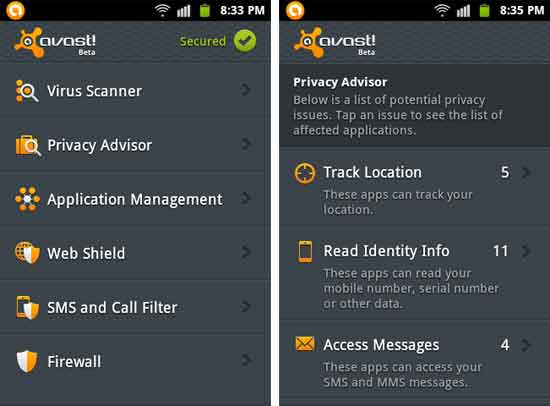
Avast has been popular as a PC antivirus because of its large features that are available in trial or for free.

It also adds up a firewall apart from all those features that other antivirus apps provide.

Its anti theft feature is quite good with loads of new things like GPS tracking, app disguiser, etc.

Avast is very common among android users and it has got a well number of reviews.

Stealth mode, self-protection, trusted sim card list, remote settings change, etc are some great features that Avast provides.


avast! Mobile Security in Google Play

Opera Vs. Dolphin Browser


Opera Mini Web Browse

Powerful servers to compress data up to 90% before sending it to your phone, so page loads are fast as light. Opera Mini is easy to use and Opera Link enables you to synchronize data between your phone and computer.

The Best
  • Lightning speedy mobile web browser.
  • Full web browsing in a mobile experience.
  • Opera Link enabling synchronizing bookmarks between desktop and phone.
  • Tabs browsing is supported.
  • Double Tap Zoom.
The Worst
  • Viewing YouTube videos from the browser is not available.


Dolphin Browser 

Dolphin Browser gives you a better Mobile Internet browsing. Features: Gesture, Sync Google bookmark, Download YouTube videos, Multi-touch 4 DROID, Hero & cyanogen*, Save cache 2 SD, Tab view, Theme pack support. As a tip Hold BACK to exit and quit & clear cache entirely.

The Best
  • Android web browser with more features user experience enhancements over the built in android web browser
  • Multi touch Pinch Zoom
  • Gestures as shortcuts for usual commands
  • Tabbed browser for mobile
  • Saving Cache/History to SD Card
The Worst
  • Update: Google requested YouTube Downloader feature to be removed

Saturday, 23 June 2012

Feedly Vs. Pulse News Reader


Feedly is a new, cheerful RSS reader that integrates without problems with Google Reader and comes with a host of settings, functions and options. There is also a Google Chrome application for syncing your RSS experiences between your phone and computer. The app comes with a cool widget too, so you can get your feeds directly to your home-screen.
The Best
  • Smart, stylish alternative RSS feed reader of Google Reader.
  • Wonderful interface and screen transitions.
  • Choice to change screen color; day reading/night reading.
  • Hosts a multiplicity of additional RSS sources for you to discover.
  • Pleasing and easy user experience.
  • Funky widget.
The Worst
  • Very occasional lag likened with Google Reader.
  • Sometimes the home screen gets fixed as it is loading.
  • junior transition bugs.


Pulse News Reader. A nice application that makes browsing news from websites and social networks amusing and engaging. Pulse takes your preferred websites (including Facebook) and transforms them into a colorful and interactive mosaic. Tap on any article, and you will see a simple and elegant view of the story. Sharing a story through Facebook, Twitter or email is as easy as two taps. Pulse has been featured in The New York Times, Wall Street Journal, Fortune, Business Week, Techcrunch and others. Experience Pulse today, you will never look at news the same way another time.

Pros
  • Displays all of your news feeds in a “colorful mosaic” style related to that of a magazine.
  • Comes with bundled ahead news feeds and predefined news sources making it easy to find the news you need.
  • Extremely feature rich and easy to use.
  • Enables you to have multiple pages of content.
  • Integrates with Facebook &Twitter.
  • Enables you to pull from Social Feeds like PicPlz, YouTube, and Digg.com.
Cons
  • Very easy to exit out of by chance.
  • Cause of limitations imposed by big news companies some feeds will only display properly if you have Pulse Reader display the website with the original news content.

Saturday, 14 April 2012

LauncherPro Vs. ADW.Launcher

LauncherPro Home Screen Replacement


LauncherPro

Based on the normal Android Launcher (Home app), LauncherPro adds some new and exciting features such as Super-smooth scrolling, Animated screen previews (such as Exposé or HTC Sense), Up to seven home screens, App drawer with a fly-in effect and smooth scrolling, Shortcut dock, You can notice the change log at my website listed below.


The Best


Seven home screens for widgets, shortcuts, bookmarks, and apps.


Pinch to see all home screens in a fast speed.


Faster/smoother scroll in list of Android Apps


Notification icon with numbers for new text messages, missed calls and new emails.


App Link

ADW.Launcher

Customizable desktop


ADW.Launcher

ADW.Launcher is an Opensource home replacement app. It's Features like Customizable desktop previews, Customizable application drawer (old one or iphone/galaxy one), Customizable drag & drop action buttons, unveils the Dockbar flicking-up the app-drawer button and drop other 6 shortcuts/folders/apps!


The Best


Experience up to 7 home screens for widgets, shortcuts, bookmarks, and apps.


Preview all home screens at fast speed


List of Android Apps feature swipe among screens


The Worst


No Pinch movment to see all home screens, you must tap the Home button again for preview


Only For Android 2.0+


App Link

Wednesday, 11 April 2012

AirDroid Vs. File Expert, Android File Manager

AirDroid is an already enormously popular Android management application that lets you control your device via your web browser. Incredibly facile to set up, it is a mighty and useful tool for managing content on your Android. You are able to view pictures, send and receive SMS text messages, install and remove apps, manage contact.


The Best
  • Huge array of controls from web browser to the cell phone.
  • Nice User Interface (both phone and web).
  • Android file management.
  • The ease to use.
The Worst
  • Device picture matching is not available currently>
 App Link


File Expert is mighty File Manager/WIFI File Transfer Web & FTP/App Manager. It's all in one. Powerful & Leading File Manager for Android. We have thousands of new users each day! All usual file operations such as Copy, Paste, Move, Create and Rename your files and folders. FTP/HTTP Server. Share & Manage your files without a USB cable, just like with Web Sharing or WIFI File Explorer.


The Best
  • Easy to deal for batch file handling like copy, paste, move, install application, extract zip, etc.
  • Easy to make HTTP and FTP file sharing.
  • Allows easy access to the folders you use the most.
  • Customizable toolbar to get easy access to the functions which you use continuously.
  • quiet install and uninstall for root users. enables you to install a batch of applications without having to accept individual permissions.
  • The whole functionality of a application manager, file explorer, and archive manager rolled into one.
The Worst
  • Application is highly useful but lacks any good visuals with decease it's .
  • The top and bottom tool bar take up a lot of important screen space.

Friday, 30 March 2012

AccuWeather Vs. The Weather Channel


AccuWeather for Android

 AccuWeather for Android is probably the most famous weather app. It’s a free weather app for Android that has all of the needed features and functions I would need packaged in a clean and sleek user interface. It has interesting option is the ability to share weather data with through email, Google+, Facebook, Twitter, and more. Save up to 10 favorite destinations that show current temperature along with a short description.

Positive:
  • Doppler radar included
  • Weather alarms
  • Day and night forecasts
  • Latest news and broadcast-quality weather videos.

 Negative:

  • Does not support pinch to zoom on Doppler radar. 

AccuWeather Link


The Weather Channel

The Weather Channel gives a weather app for Android of its own. The TV channel that offers nothing but weather news 24/7 puts that same information in the palm of yours. 

The Weather Channel for Android app is not as glossy as some of the other weather apps for Android are, but it does have a certain quality of data that make it unique than all the others. With it at least you can count on the fact that the data is vetted by a large team of on-staff weather professionals meteorologists. The same can not be said of the others.

Positive:
  • Doppler radar
  • Video forecasts
  • Weather alerts
  • Temperature is in the notification bar.

Negative:

  • cannot save favorite locations.


The Weather Channel